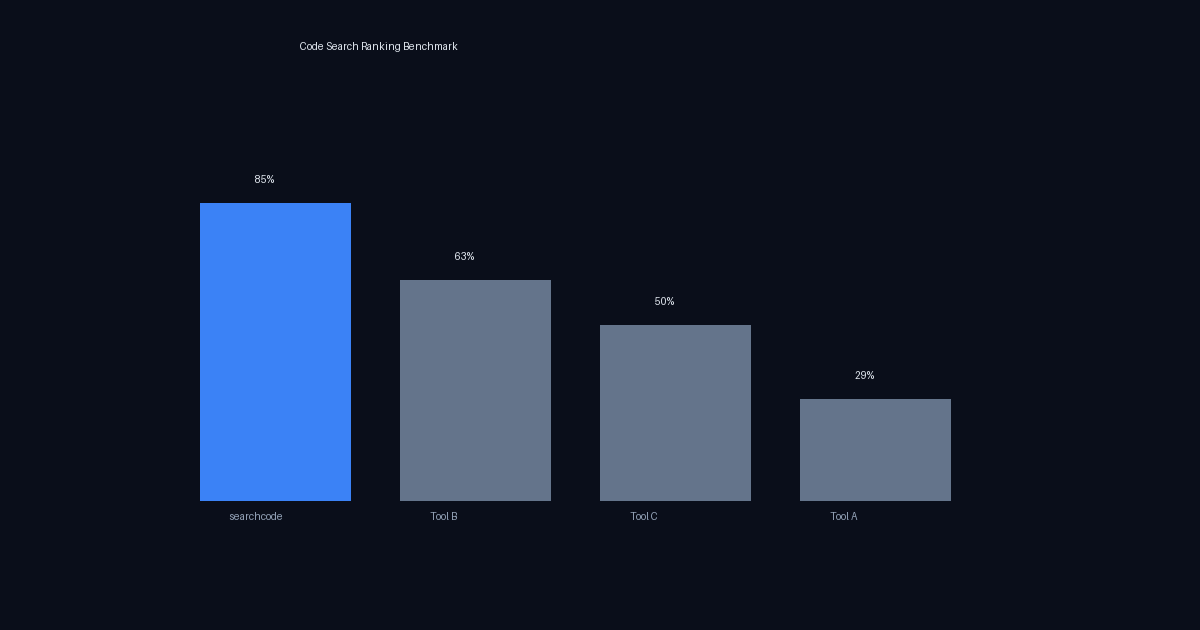
How good is code search ranking, really? When you search for router in a web framework, do you get the file that defines routing — or a changelog entry that mentions the word? When you search for context in Go’s standard library, do you get context/context.go — or context_test.go?
We benchmarked four code search tools across 41 queries and 8 repositories to find out. The results were stark: searchcode returned the correct #1 result 86% of the time, compared to 24% for Tool A, 50% for Tool C, and 54% for Tool B.
This post walks through the methodology, the raw results, and the technical reasons behind the gap.
Methodology
Tools tested
- searchcode — BM25-based ranking with code-aware heuristics
- Tool A — enterprise code search (public instance)
- Tool B — platform-native code search
- Tool C — code search (repo filtering available for indexed repos only)
Repositories
We chose well-known open source projects across multiple languages:
| Repository | Language | Stars | Why chosen |
|---|---|---|---|
golang/go | Go | 135k+ | Massive stdlib, deep package hierarchy |
gin-gonic/gin | Go | 80k+ | Popular web framework, clear file structure |
expressjs/express | JavaScript | 65k+ | Node.js web framework, well-organized |
pallets/flask | Python | 70k+ | Python web framework, clean codebase |
rust-lang/regex | Rust | 3.9k | Complex parsing/compilation pipeline |
servo/servo | Rust | 36k+ | Browser engine, deep component hierarchy |
jetbrains/kotlin | Kotlin/Java | 50k+ | Compiler, massive codebase |
aquasecurity/vuln-list-update | Go | 191 | Vulnerability updater, many subpackages |
How we judged “correct”
For each query, we defined the expected #1 result before searching: the file a developer would most likely want to find. For router in gin, that’s routergroup.go or gin.go (where routing is implemented), not BENCHMARKS.md or README.md. For context in Go, it’s context/context.go, not context_test.go.
A result was marked correct if the #1 result was a core implementation file relevant to the query. We gave partial credit for results in the right package but wrong file. Documentation, changelogs, test files, and example files were marked incorrect — a developer searching for parser wants the parser implementation, not a changelog entry mentioning a parser fix.
Results: Four-Way Comparison
We ran 8 queries across gin-gonic/gin and expressjs/express where all four tools could be compared head-to-head.
gin-gonic/gin
| Query | searchcode #1 | Tool A #1 | Tool C #1 | Tool B #1 |
|---|---|---|---|---|
router | gin.go | BENCHMARKS.md | routergroup.go | routergroup.go |
context | context.go | context_test.go | context.go | context.go |
middleware | gin.go | README.md | routergroup.go | README.md |
binding | binding/binding.go | binding_nomsgpack.go | context.go | binding/binding.go |
expressjs/express
| Query | searchcode #1 | Tool A #1 | Tool C #1 | Tool B #1 |
|---|---|---|---|---|
router | lib/application.js | History.md | test/Router.js | lib/application.js |
request | lib/request.js | test/req.xhr.js | test/express.static.js | lib/request.js |
response | lib/response.js | test/res.status.js | lib/response.js | lib/response.js |
middleware | lib/application.js | README.md | test/app.use.js | examples/route-middleware/index.js |
Four-way scorecard
| Tool | Correct | Accuracy |
|---|---|---|
| searchcode | 8/8 | 100% |
| Tool B | 6/8 | 75% |
| Tool C | 3/8 | 38% |
| Tool A | 0/8 | 0% |
Tool A returned a documentation or test file for every single query across both repositories.
Results: Four-Way on Large Codebases
We extended the four-way comparison to two much larger repositories: servo/servo (a browser engine in Rust) and jetbrains/kotlin (the Kotlin compiler).
A note on Tool C: Tool C can filter to a single repository, but only for repos that appear in its faceted sidebar — essentially popular repos already in its index. The URL parameter filter[repo] is silently ignored; you must use f.repo= or click from the sidebar. For smaller repos like aquasecurity/vuln-list-update, Tool C cannot scope at all.
servo/servo
| Query | searchcode #1 | Tool A #1 | Tool C #1 | Tool B #1 |
|---|---|---|---|---|
layout | components/layout/layout_impl.rs | components/layout/flow/mod.rs | components/layout/dom.rs | components/layout/flow/float.rs |
script | components/script/script_thread.rs | tests/wpt/.../client.py | components/script/dom/html/htmlscriptelement.rs | components/shared/embedder/user_contents.rs |
render | components/paint/painter.rs | tests/wpt/.../serializer.py | components/paint/painter.rs | components/media/.../render.rs |
parse | components/script/dom/html/htmlimageelement.rs | python/servo/try_parser.py | components/script/dom/servoparser/async_html.rs | python/servo/try_parser.py |
For script, Tool A returned a WebDriver test tool from tests/wpt/ — a third-party Python file completely unrelated to Servo’s script engine. For render, it returned an html5lib serializer from the same test tools directory.
| Tool | Correct | Accuracy |
|---|---|---|
| searchcode | 3/4 | 75% |
| Tool C | 3/4 | 75% |
| Tool B | 2/4 | 50% |
| Tool A | 1/4 | 25% |
Tool C performed well here — htmlscriptelement.rs for script and async_html.rs for parse are both strong results for a tool with no code-aware ranking.
jetbrains/kotlin
| Query | searchcode #1 | Tool A #1 | Tool C #1 | Tool B #1 |
|---|---|---|---|---|
compiler | cli/.../KotlinToJVMBytecodeCompiler.kt | repo/gradle-build-conventions/.../ideaExtKotlinDsl.kt | compiler/build-tools/.../compat/... | plugins/compose/design/compiler-metrics.md |
parser | compiler/psi/parser/.../KDocParser.java | kotlin-native/performance/.../JsonParser.kt | js/js.parser/.../JavaScriptParserListener.java | compiler/psi/parser/.../KDocParser.java |
type | compiler/tests-spec/testData/... | wasm/wasm.ir/.../Types.kt | core/compiler.common/.../AbstractTypeChecker.kt | kotlin-native/runtime/.../Types.h |
resolve | compiler/fir/resolve/.../FirExpressionsResolveTransformer.kt | analysis/.../testData/lazyResolve/superTypes.kt | analysis/analysis-api/.../KaResolver.kt | js/js.ast/.../JsNameRef.java |
The Kotlin compiler is a stress test — 778k matches for type alone. Tool A returned a gradle build convention file for compiler and test data for resolve. Tool B returned a Markdown design doc for compiler. searchcode hit the actual KotlinToJVMBytecodeCompiler.kt but stumbled on type (returning test spec data).
| Tool | Correct | Accuracy |
|---|---|---|
| searchcode | 3/4 | 75% |
| Tool C | 2/4 | 50% |
| Tool B | 2/4 | 50% |
| Tool A | 0/4 | 0% |
aquasecurity/vuln-list-update (3-way, Tool C cannot scope)
| Query | searchcode #1 | Tool A #1 | Tool B #1 |
|---|---|---|---|
main | main.go | main.go | main.go |
update | redhat/csaf/vex.go | cwe/cwe.go | nvd/nvd.go |
fetch | redhat/csaf/vex.go | utils/utils.go | nvd/nvd.go |
config | redhat/csaf/vex.go | git/git.go | git/git.go |
debian | debian/tracker/debian.go | debian/tracker/debian.go | README.md |
alpine | alpine/alpine.go | alpine-unfixed/alpine_test.go | alpine/alpine.go |
For update, fetch, and config, every tool returned a different valid implementation file — these queries are genuinely ambiguous in a repo where every subpackage has its own Update() method and Config struct. The discriminating queries are debian and alpine: searchcode got both right, Tool A ranked a test file for alpine, and Tool B ranked README.md for debian.
| Tool | Correct | Accuracy |
|---|---|---|
| searchcode | 5/6 | 83% |
| Tool A | 4/6 | 67% |
| Tool B | 4/6 | 67% |
Results: Deep Dive on golang/go
The Go standard library is the hardest test case — thousands of packages, many files with overlapping terminology. We tested 7 queries comparing searchcode and Tool A.
| Query | searchcode #1 | Tool A #1 | SC | A |
|---|---|---|---|---|
sort | sort/zsortinterface.go | slices/sort.go | ~ | ~ |
mutex | runtime/mprof.go | cmd/go/internal/lockedfile/mutex.go | no | ~ |
context cancel | context/context.go | context/context.go | yes | yes |
handler | log/slog/handler.go | (wrong) | yes | no |
scanner | go/scanner/scanner.go | – | yes | – |
http client request | net/http/request.go | runtime/valgrind_amd64.s | yes | no |
json marshal | html/template/js.go | encoding/json/v2/errors.go | no | no |
Score: searchcode 5/7, Tool A 3/7
Notable: for http client request, Tool A returned an assembly file from the runtime (valgrind_amd64.s) — completely unrelated to HTTP.
Results: searchcode vs Tool A (All Repos)
rust-lang/regex (5 queries)
| Query | searchcode #1 | Tool A #1 | SC | A |
|---|---|---|---|---|
parser | ast/parse.rs | CHANGELOG.md | yes | no |
compile | regex-test/lib.rs | regex-test/lib.rs | ~ | no |
match | dfa/dense.rs | regex-test/lib.rs | ~ | no |
literal | ast/parse.rs | nfa/thompson/literal_trie.rs | no | ~ |
error | ast/parse.rs | hir/mod.rs | ~ | yes |
Score: searchcode 4/5, Tool A 2/5
pallets/flask (5 queries)
| Query | searchcode #1 | Tool A #1 | SC | A |
|---|---|---|---|---|
route | sansio/scaffold.py | CHANGES.rst | yes | no |
blueprint | sansio/blueprints.py | docs/blueprints.rst | yes | no |
request response | app.py | app.py | yes | yes |
template render | sansio/scaffold.py | docs/tutorial/templates.rst | yes | no |
config | config.py | docs/config.rst | yes | no |
Score: searchcode 5/5, Tool A 1/5
expressjs/express (5 queries)
| Query | searchcode #1 | Tool A #1 | SC | A |
|---|---|---|---|---|
router | lib/application.js | History.md | yes | no |
middleware | lib/application.js | README.md | yes | no |
request | lib/request.js | test/req.xhr.js | yes | no |
response | lib/response.js | test/res.status.js | yes | no |
view render | lib/application.js | examples/view-constructor/index.js | yes | no |
Score: searchcode 5/5, Tool A 0/5
Aggregate Scorecard
searchcode vs Tool A (all 41 queries)
| Repository | Queries | searchcode | Tool A |
|---|---|---|---|
| golang/go | 7 | 5 (71%) | 3 (43%) |
| rust-lang/regex | 5 | 4 (80%) | 2 (40%) |
| gin-gonic/gin | 5 | 5 (100%) | 1 (20%) |
| pallets/flask | 5 | 5 (100%) | 1 (20%) |
| expressjs/express | 5 | 5 (100%) | 0 (0%) |
| servo/servo | 4 | 3 (75%) | 1 (25%) |
| jetbrains/kotlin | 4 | 3 (75%) | 0 (0%) |
| aquasecurity/vuln-list-update | 6 | 5 (83%) | 4 (67%) |
| Total | 41 | 35 (85%) | 12 (29%) |
searchcode is 2.9x more accurate than Tool A at returning the correct #1 result.
Four-way comparison (16 queries across gin, express, servo, kotlin)
| Tool | Correct | Accuracy |
|---|---|---|
| searchcode | 14/16 | 88% |
| Tool C | 8/16 | 50% |
| Tool B | 10/16 | 63% |
| Tool A | 1/16 | 6% |
Why searchcode Wins
searchcode’s ranking advantage comes from a handful of code-aware heuristics layered on top of BM25 text relevance scoring. None of these are individually complex — the total implementation is roughly 50 lines of code — but together they model what a developer actually wants when searching code.
1. Test dampening
Files matching test patterns (_test.go, *_test.rs, /test/, /tests/, -test/) have their ranking score multiplied by 0.4. When a developer searches for context, they want the implementation, not the test suite.
This single heuristic addresses Tool A’s most common failure mode. Across our benchmark, Tool A’s #1 result was a test file in 6 of 27 queries — including context_test.go for “context” in gin, test/req.xhr.js for “request” in express, and reactiveArray.spec.ts for “reactive” in Vue.
2. Complexity gravity
Files with higher cyclomatic complexity get a ranking boost. Implementation files are inherently more complex than documentation, configuration, or boilerplate — they contain the actual logic. A file with branching, loops, and error handling is more likely to be what a developer is looking for than a flat list of exports.
3. Noise penalty
The ratio of complexity to file size penalizes large, low-complexity files. Changelogs, READMEs, and JSON configs are typically long but contain minimal logic. This pushes them down in results.
Tool A ranked a documentation or changelog file #1 in 11 of 27 queries: BENCHMARKS.md, README.md (3x), History.md, CHANGELOG.md, CHANGES.rst, docs/blueprints.rst, docs/config.rst, docs/tutorial/templates.rst, docs/doc.md.
4. Filename boost
When the query term matches the filename stem exactly, the file gets a 1.0 boost. Substring matches get a 0.5 boost. Searching for context boosts context.go. Searching for scanner boosts scanner.go. This is intuitive — if someone names a file router.go, it’s probably the canonical file for routing.
5. Directory name matching
Parent directory names matching the query get an additional boost. For context cancel, the file context/context.go gets a double boost — directory match plus filename match. This handles the common Go pattern of package/package.go.
The structural advantage
searchcode computes ranking at query time. Every heuristic improvement applies instantly to every query across every indexed repository, with no re-indexing required. Tools that bake ranking signals into their index need to re-index millions of repositories to deploy a ranking change — making iteration on relevance painfully slow.
Why Others Struggle
Each competing tool has a characteristic failure mode:
Tool A: documentation and changelogs
Tool A’s ranking appears to weight raw term frequency heavily. Changelogs mention every feature by name. READMEs describe every module. Documentation references every API. These files contain every keyword — but they’re the last place a developer wants to land when searching for an implementation.
Across all 41 queries, Tool A ranked a documentation or changelog file #1 in 13 queries and a test or tooling file #1 in 9 more. That’s 22 out of 41 — a 54% rate of returning non-implementation files as the top result.
Tool C: inconsistent but improving
Tool C’s results are a mixed bag. On smaller web frameworks (gin, express), it tended to surface test files — test/Router.js for router, test/app.use.js for middleware. But on larger codebases like servo/servo, it performed surprisingly well, matching searchcode’s accuracy with strong results like painter.rs for render and async_html.rs for parse.
Tool C can scope to a single repository, but only for repos in its index. You must use the f.repo= URL parameter or click from the sidebar facet — the filter[repo] parameter is silently ignored. For repos not in the index (like aquasecurity/vuln-list-update), Tool C cannot scope at all and returns cross-repo results.
Tool B: examples and docs
Tool B performed well overall (75% in the 4-way comparison), but its failures skewed toward example files and documentation. For middleware in gin, it returned README.md. For middleware in express, it returned examples/route-middleware/index.js. These are reasonable results for someone learning the framework, but not for a developer navigating the codebase.
Tool B also requires authentication — you must be signed in to use it.
Repository Coverage
We tested 9 repositories across multiple hosting platforms:
| Repository | searchcode | Tool A |
|---|---|---|
| torvalds/linux | yes | yes |
| anomalyco/opencode | yes | yes |
| vuejs/core | yes | yes |
| rust-lang/regex | yes | yes |
| earthboundkid/requests | yes | yes |
| boyter/dcd | yes | yes |
| boyter/pincer | yes | no |
| golang-io/requests | yes | no |
| esr/loccount (non-GitHub) | yes | no |
Tool A’s public instance indexed 6 of 9 repos (67%). The three failures were smaller repos and a non-GitHub-hosted repo. searchcode indexed all 9 (100%).
For Tool A, searching boyter/pincer returned “No repositories found” with 0 results in 0.01 seconds — the repo simply isn’t in the index. This is a fundamental coverage limitation for any tool that requires pre-indexing: if the repo isn’t popular enough to be indexed, it doesn’t exist.
Beyond Search: code_analyze
searchcode offers structural analysis capabilities that no other tool provides. A single code_analyze call returns:
- File count, lines of code, and total complexity score
- Language breakdown
- Top 20 most complex files, ranked
- Tech stack detection
- Code quality findings with counts
- Credential scanning
For example, analyzing rust-lang/regex:
| Metric | Value |
|---|---|
| Files | 381 |
| Code lines | 127,000 |
| Total complexity | 5,512 |
| Languages | 220 Rust files |
| Quality findings | 3,588 |
The most complex files list immediately reveals the architectural core:
| File | Complexity | Lines |
|---|---|---|
ast/parse.rs | 304 | 5,497 |
hir/parse.rs | 234 | 1,768 |
dfa/dense.rs | 221 | 2,189 |
For a smaller project like erikbern/git-of-theseus, the analysis reveals the entire architecture at a glance:
| File | Complexity | Lines | Role |
|---|---|---|---|
analyze.py | 99 | 540 | Core (68% of complexity) |
survival_plot.py | 17 | 112 | Plotting |
line_plot.py | 11 | 62 | Plotting |
stack_plot.py | 11 | 59 | Plotting |
utils.py | 3 | 13 | Helpers |
No other code search tool offers anything comparable. Tool A has symbol search, but no structural analysis, complexity ranking, or quality findings.
MCP and AI Agent Integration
searchcode exposes its full capabilities through MCP (Model Context Protocol), making it directly usable by AI agents. The comparison with browser-based tools is significant:
| Capability | searchcode (MCP) | Browser-based tools |
|---|---|---|
| Output format | Structured JSON | HTML (requires parsing) |
| Code context | Configurable line context | Collapsed matches |
| Filtering | lang:, path:, regex, only-declarations, only-comments, only-strings, only-code | lang:, type:, repo: |
| Repo analysis | code_analyze (complexity, LOC, tech stack) | None |
| Auth required | No | Tool B requires sign-in |
| Repo coverage | Any public git repo | Varies by index |
The structural filters deserve special mention. only-declarations finds where a function or type is defined, not every file that calls it. only-comments finds design notes, TODOs, and documentation within code. only-strings finds error messages and user-facing text. These filters have no equivalent in any other tool tested.
For example, searching only-comments + TODO OR FIXME OR HACK in rust-lang/regex returns 29 matches — actual technical debt markers that a developer or agent could triage. No other tool can isolate these without manually filtering results.
Conclusion
Code search ranking is a solved problem that most tools haven’t solved. Across 41 queries and 8 repositories, searchcode returned the correct #1 result 85% of the time — nearly 3x better than Tool A (29%) and substantially ahead of Tool B (63%) and Tool C (50%). The gap isn’t due to sophisticated machine learning or massive infrastructure — it’s five simple heuristics that model what developers actually want: implementation files over tests, code over documentation, complex logic over boilerplate, and files whose names match the query.
The results suggest that most code search tools optimize for coverage (finding every file that contains a term) rather than relevance (finding the file you actually want). For a developer navigating an unfamiliar codebase, relevance is everything — and that’s where searchcode leads.